Benchmarking Containerized MPI with Apptainer on Dell PowerEdge and Cornelis Omni-Path
This article was also published via the CIQ blog on 6 September 2023.
In a previous article, I demonstrated how Warewulf makes it simple to deploy an HPC cluster. Now, I don’t know about you; but, once I have a cluster, I immediately start looking for something to run on it. But I’m a systems guy—not a domain scientist—so that usually means I start benchmarking.
Recently at CIQ, we’ve been advocating for attention and development around containerization of MPI using Apptainer. In particular, we’ve been championing the use of PMI to support completely portable MPI containerization, where the containerized application shares no MPI dependency with the host system. It’s our hope that, by making containerized MPI more portable and more broadly applicable, we’ll see even broader adoption of containerization in HPC.
But this increased adoption brings stronger questions about performance: do containerized MPI applications perform as well as the same applications running directly in the host environment?
So what are we doing here?
My focus here is on MPI performance, not necessarily CPU or memory
performance. With that in mind, I selected the OSU
Micro-Benchmarks
suite for my test cases. In particular, I used osu_bw, osu_bibw,
and osu_alltoall.
As I started to run benchmarks and follow my curiosity, the number of test cases grew: originally, this was just supposed to be a simple demonstration at the end of the previous article! But to keep even this separate writeup to a reasonable scope, I focused on these questions:
Does performance differ between the host Rocky Linux 8 environment and a container?
Does performance change if a Rocky Linux 9 container runs on a Rocky Linux 8 host?
Does performance differ between Apptainer containers with “user namespaces” compared to Apptainer running with its original SUID starter?
Does behavior change when running tasks across nodes vs. all on a single node?
Benchmark environment
To review: we’ve got a cluster of four compute nodes in a Dell PowerEdge C6525 multi-node server. Each node is equipped with 2x AMD EPYC 7702 CPUs, 256GiB system memory, and a 100Gb Cornelis Omni-Path HFI. All four nodes are connected to a single Cornelis Omni-Path switch.
To maintain consistency between the host and container environments, I
used Spack v0.20.1 to build nine different
versions of OSU Micro-Benchmarks, with variants for MPI
(MPICH,
MVAPICH, and Open
MPI) and operating environment (the
compute node’s Rocky Linux 8.8 environment, a Rocky Linux 8.8 SIF, and a
Rocky Linux 9.2 SIF). I used Spack’s built-in
“containerize”
functionality to build the SIFs. The Spack “specs” for each build, and
the Spack environment YAML files used for spack containerize, are
included as attachments.
All tests were run on the same host kernel,
4.18.0-477.15.1.el8_8.x86_64, and all container tests used Apptainer
version 1.2.2-1.el8.
All tests were run with the same Slurm arguments, including an explicit
--nodelist argument to ensure that all tests were run on the same
nodes. These complete commands are included in an attachment.
All three MPI implementations were built using libfabric which, in turn, was built with support for OPX, the latest and recommended libfabric provider for use with Cornelis Omni-Path. We were able to verify that OPX was being properly detected and activated using logging capabilities of libfabric common to all of our builds, and these records are attached as well.
Does performance differ between the host and a container?
Our first question is the simplest: does containerization with Apptainer
reduce the MPI performance of an application? From our experience here,
we can say that it does not. In fact, we saw somewhat improved
latencies for osu_alltoall in containerized environments, and any
bandwidth performance differences were within general run-to-run
variance. In fact, some of our highest performance differences were
observed simply from rebooting compute nodes and re-running the same
test.
Raw results for these and other tests are included as attached CSV files at the end of the article.
Does performance change for a Rocky Linux 9 container?
Containerization isn’t just about running an application in an identical operating environment to the compute node host: it enables the flexibility to run different versions of an operating system, or even entirely different operating systems, within the container. So what if we run a different version of Rocky Linux–9.2, in our tests here–compared to the Rocky Linux 8.8 that is running on the compute node?
The question isn’t entirely unfounded: Cornelis Omni-Path support, for example, is built on a mixture of kernel and user-space components. For our tests, we’re using the support for OPA included in the Rocky Linux kernel, and each version of Rocky Linux includes user-space libraries and applications designed to work with its matching kernel components. The nature of containerization, however, implies that we’re using the kernel components from the host, regardless of what user-space code is running in the container. So what happens if we run an MPI built for a Rocky Linux 9.2 environment on a Rocky Linux 8.8 kernel?
While we obviously can’t speak for all kernel and user-space pairings,
our results indicate that even this difference isn’t something to worry
about. Most results were within run-to-run variance, with yet another
apparent improvement in osu_alltoall latency. (This improvement
probably shouldn’t carry too much weight, however, given the limitations
of our testing methodology; but we’ll talk more about that in the
conclusion.)
Does performance differ for Apptainer SUID and user namespace modes?
If you’ve been following Apptainer development, one of its more recent
improvements is the transition, by default, from its original SUID-based
runtime to the adoption of more modern Linux kernel support for user
namespaces.
For example, we need to be root to set up a container and, when
building a container, to install packages within it. In the past, this
has been accomplished with the use of starter-suid and fakeroot.
Now, by default this is accomplished using Linux user namespaces.
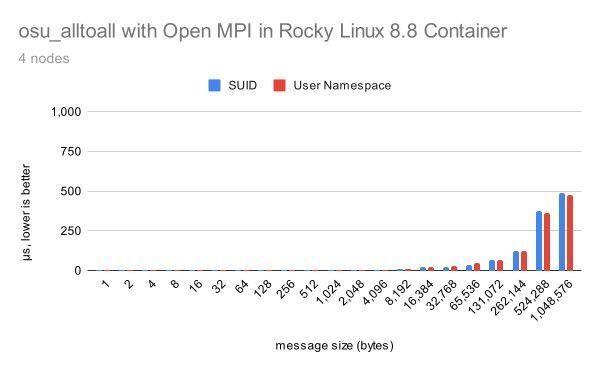
But the questions remains: does Apptainer’s use of user namespaces impact performance?
We ran this test by physically uninstalling the apptainer-suid
package. Similar to our previous results, we found that performance was
effectively identical, once again with the most significant (but still
only slight) variations observed in the latency of osu_alltoall.
Does behavior change for multi-node vs. single-node?
Up to now, all of our tests have been run with one MPI task per node; but we also wanted to check if behavior would change when multiple tasks were run on each node. However, there have been multiple reports of MPI breaking in Apptainer with user namespaces, particularly when using UCX. We wanted to check if the same behavior was observed with these libfabric builds of MPI without UCX.
For this particular test case, we focused specifically on
osu_alltoall, as it supports running an arbitrary number of tasks.
Rather than running one tasks per node across four nodes, we ran four
tasks on one node, with two tasks per socket.
It is interesting to observe that MPICH and Open MPI latency degrades more in this scenario than MVAPICH. We also observed (though this is not represented in the charts) that the increase in latency is broadly similar between host and container environments. But more to the point of the test is the fact that MVAPICH breaks with 8MiB and larger messages. Our current understanding is that MVAPICH optimizes intra-node communication for different message sizes, and the method it uses for messages 8MiB and larger is blocked by different MPI tasks running in different user namespaces.
We’ve been investigating this issue upstream for some time now, including a pull request. Check back here soon for a whole article going into detail on why it’s breaking, how you might be able to work around it today, and how we’re hoping to fix it upstream!
Conclusion
While we did our best to be consistent and transparent in our methodology, these aren’t quite what we’d consider formal results. For example, we noticed significant performance variation from run-to-run, particularly after rebooting nodes that had been used for previous jobs and then sat idle. Improvements to our methodology might include reboots between each test and averaging the results from multiple runs. (We ran each test three times and used the third result.) All that said, we think that even this relatively anecdotal experience confirms what we and the Apptainer community have been saying for years: Apptainer containerization is suitable for use with HPC applications, including performance-sensitive MPI applications.
If you’re interested in learning more about the performance you can expect from your MPI applications in Apptainer, there are a number of studies:
Evaluation and Benchmarking of Singularity MPI Containers on EU Research e-Infrastructures, a collaborative effort by many researchers across Europe, found that performance of containerized applications was “very close to those obtained by the native execution.”
Benchmarking MPI Applications in Singularity Containers on Traditional HPC and Cloud Infrastructures, by Andrei Plamada and Jarunan Panyasantisuk of ETH Zürich, “did not experience any overhead,” but expressed concern about the need to match the container environment with the host environment. (Thankfully, we’ve found a solution to that particular issue!)
Performance Analysis of Applications using Singularity Container on SDSC Comet, by Emily Le and David Paz of University of California, San Diego, found that “its negligible performance overhead should not be a significant decision factor when considering its intended applications as the performance is fairly close to non-containerized jobs.”
Testing MPI Applications Performance in Singularity Containers, by Alexey Vasyukov and Katerina A. Beklemysheva of the Moscow Institute of Physics and Technology, found that such containers “allow achieving performance metrics that corresponding to the values for bare-metal in the default container setup,” with the same caveat of concern regarding mismatched libraries between the host and container. (Again, just to be clear, this should no longer be an issue.)
We’re hopeful that these results can let HPC administrators and users alike proceed with confidence that they aren’t sacrificing performance when they take advantage of the operational and flexibility benefits of using Apptainer in their environment.